How to link a task to an event
-Jul-12-2024-06-57-45-4255-PM.png?width=654&height=94&name=SC%20-%20Atividades%20-%20Tarefas%20(6)-Jul-12-2024-06-57-45-4255-PM.png)
1. Click on + add
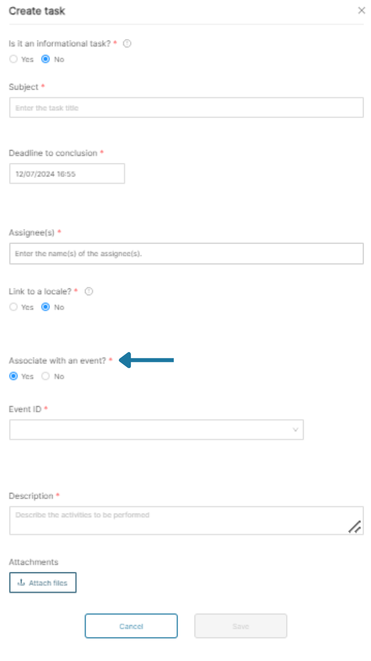
2. In Link to an event? select yes
-Jul-12-2024-07-02-40-0313-PM.png?width=371&height=661&name=SC%20-%20Atividades%20-%20Tarefas%20(1)-Jul-12-2024-07-02-40-0313-PM.png)
3. Search for the event ID and select the one you want to link.
4. Complete the form and click save.

How to link a task to an event
1. Click on + add
2. In Link to an event? select yes
3. Search for the event ID and select the one you want to link.
4. Complete the form and click save.